This blog post aims to bridge the gap for Trusted Platform Module (TPM) log analysis. SWTPM is a software TPM emulator developed by David Safford and Stefan Berger at IBM. SWTPM logs display hexadecimal bytes sent to and from SWTPM, but no human-readable logs are available. Per the author of SWTPM, it’s possible to use the ioctl definitions and Trusted Computing Group (TCG) paperwork to decode the traffic by hand. Wireshark has a high-quality TPM traffic decoder, but it doesn’t work with the log files from SWTPM unless you first convert them to a PCAP file.
Earlier this year, I mentioned to Stefan Berger that SWTPM does not support exporting logs to a PCAP file, and he was kind enough to implement a PCAP writer in SWTPM natively using the --pcap option. This option is currently available in the master branch; in the meantime, for versions of SWTPM packaged in Linux distributions, including Debian which Proxmox runs on, it’s possible to convert the hexadecimal logs to a PCAP using the open source swtpm-log-to-pcap script. This blog post walks through using the script for logs generated by a Proxmox virtual machine with the SWTPM enabled.
Background
Trusted Platform Modules (TPMs) are hardware root of trust devices that are used in cryptographic operations, often in conjunction with full-disk encryption and secure boot. Articles and resources for TPM traffic analysis are quite sparse, making it difficult to test TPM configurations and validate whether the TPM is behaving correctly.
SWTPM is a software implementation of TPMs. You may be familiar with SWTPM if you ever used Proxmox’s TPM feature, which wholly relies on SWTPM. SWTPM logs simply dump the hexadecimal bytes of traffic to the TPM and from the TPM, but no decoding or other details are available in the official logs. In this GitHub discussion, the author of SWTPM suggests simply referring to ioctl definitions and TCG paperwork to decode the traffic by hand.
Thankfully, Wireshark has a packet dissector for the TPM protocol. All you must do is use swtpm-log-to-pcap, a small script I published on GitHub, to convert the logs to a PCAP. This script was made possible by Scapy, a packet manipulation tool developed by Philippe Biondi and the community.
Proxmox Walkthrough
1. Setting Up a Virtual Machine with TPM Support
In Proxmox, create a virtual machine with a TPM 2.0 device. The setting is available in the System tab of the Virtual Machine creation menu:

2. Modifying Proxmox scripts to enable verbose logging
After creating a virtual machine with a TPM attached, we need to modify a Proxmox script to increase SWTPM verbosity.
Note: Modifying Proxmox scripts is not an officially supported action, so a Proxmox update may revert these changes. If you notice the changes were reverted after an update, simply repeat the steps below.
Log in to Proxmox as the root user and open /usr/share/perl5/PVE/QemuServer.pm with a text editor like vim:
vim /usr/share/perl5/PVE/QemuServer.pm
Navigate to the line containing the log level and log file location for SWTPM. This is line 2892 in the example below, but the log level and log file location may be elsewhere based on the Proxmox version you are using.
"file=/run/qemu-server/$vmid-swtpm.log,level=1,prefix=$log_prefix"

Change the verbosity from 1 to 20, so that the script looks like so:

Per the above script, the SWTPM log will be in /run/qemu-server/$vmid-swtpm.log.
Then, restart the following services for the change to take effect.
Note: Running these commands will cause the web UI to become unresponsive, so I recommend doing this over SSH. If you choose to use the web shell, simply reload the page when it becomes unresponsive after each command.
systemctl restart pveproxysystemctl restart pvedaemon
Note: In the older Proxmox version 8, the services are instead called pvproxy and pvdaemon.
Confirm that when launching your VM, your log verbosity is set to 20. Perform this confirmation by grepping for the virtual machine process:
ps aux | grep swtpm.log,level --color=always
You should see output similar to what’s pictured below, confirming you have log level 20:

3. Using SWTPM and collecting the logs
Use your VM and the TPM in your virtual machine. For this example, we’ll simply install the virtual machine with LUKS full-disk encryption (FDE) and add the TPM as a disk decryption device. This operation will use the TPM and generate some very noisy logs to look at!

Note: The above command introduces a privilege escalation vulnerability wherein an adversary with physical access can drop to a root shell while bypassing full-disk encryption. This is a simple example and should not be used in a production setup of TPM-based LUKS FDE automatic unlock.
Export the SWTPM logs from Proxmox via scp or a similar mechanism:
scp root@proxmox.home.local:/run/qemu-server/103-swtpm.log .
4. Converting the logs to a PCAP
Install swtpm-log-to-pcap:
git clone https://github.com/henryreed/swtpm-log-to-pcap.gitcd swtpm-log-to-pcappython3 -m venv venvsource venv/bin/activatepip install -r requirements.txt
Run the script against your log file:
./swtpm-log-to-pcap.py 103-swtpm.log 103-swtpm.pcap
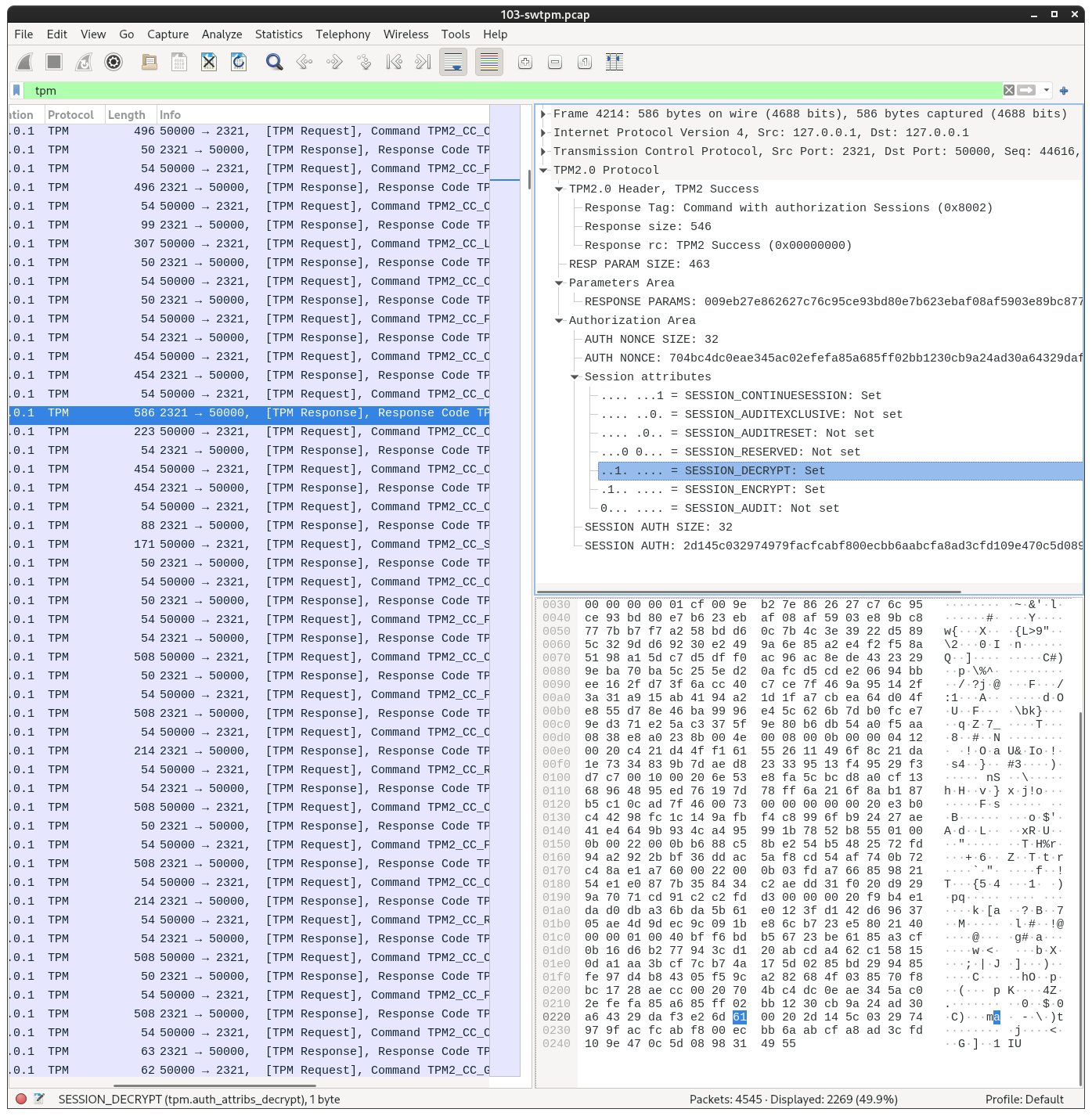
Now, logs like these:
[id=1770793277] SWTPM_IO_Write: length 546[id=1770793277] 80 02 00 00 02 22 00 00 00 00 00 00 01 CF 00 9E [id=1770793277] B2 7E 86 26 27 C7 6C 95 CE 93 BD 80 E7 B6 23 EB [id=1770793277] AF 08 AF 59 03 E8 9B C8 77 7B B7 F7 A2 58 BD D6 [id=1770793277] 0C 7B 4C 3E 39 22 D5 89 5C 32 9D D6 92 30 E2 49 [id=1770793277] 9A 6E 85 A2 E4 F2 F5 8A 51 98 A1 5D C7 D5 DF F0 [id=1770793277] AC 96 AC 8E DE 43 23 29 9E BA 70 BA 5C 25 5E D2 [id=1770793277] 0A FC D5 CD E2 06 94 BB EE 16 2F D7 3F 6A CC 40 [id=1770793277] C7 CE 7F 46 9A 95 14 2F 3A 31 A9 15 AB 41 94 A2 [id=1770793277] 1D 1F A7 CB EA 64 D0 4F E8 55 D7 8E 46 BA 99 96 [id=1770793277] E4 5C 62 6B 7D B0 FC E7 9E D3 71 E2 5A C3 37 5F [id=1770793277] 9E 80 B6 DB 54 A0 F5 AA 08 38 E8 A0 23 8B 00 4E [id=1770793277] 00 08 00 0B 00 00 04 12 00 20 C4 21 D4 4F F1 61 [id=1770793277] 55 26 11 49 6F 8C 21 DA 1E 73 34 83 9B 7D AE D8 [id=1770793277] 23 33 95 13 F4 95 29 F3 D7 C7 00 10 00 20 6E 53 [id=1770793277] E8 FA 5C BC D8 A0 CF 13 68 96 48 95 ED 76 19 7D [id=1770793277] 78 FF 6A 21 6F 8A B1 87 B5 C1 0C AD 7F 46 00 73 [id=1770793277] 00 00 00 00 00 20 E3 B0 C4 42 98 FC 1C 14 9A FB [id=1770793277] F4 C8 99 6F B9 24 27 AE 41 E4 64 9B 93 4C A4 95 [id=1770793277] 99 1B 78 52 B8 55 01 00 0B 00 22 00 0B B6 88 C5 [id=1770793277] 8B E2 54 B5 48 25 72 FD 94 A2 92 2B BF 36 DD AC [id=1770793277] 5A F8 CD 54 AF 74 0B 72 C4 8A E1 A7 60 00 22 00 [id=1770793277] 0B 03 FD A7 66 85 98 21 54 E1 E0 87 7B 35 84 34 [id=1770793277] C2 AE DD 31 F0 20 D9 29 9A 70 71 CD 91 C2 C2 FD [id=1770793277] D3 00 00 00 20 F9 B4 E1 DA D0 DB A3 6B DA 5B 61 [id=1770793277] E0 12 3F D1 42 D6 96 37 05 AE 4D 9D EC 9C 09 1B [id=1770793277] E8 6C B7 23 E5 80 21 40 00 00 01 00 40 BF F6 BD [id=1770793277] B5 67 23 BE 61 85 A3 CF 0B 16 D6 B2 77 94 3C D1 [id=1770793277] 20 AB CD A4 62 C1 58 15 0D A1 AA 3B CF 7C B7 4A [id=1770793277] 17 5D 02 85 BD 29 94 85 FE 97 D4 B8 43 05 F5 9C [id=1770793277] A2 82 68 4F 03 85 70 F8 BC 17 28 AE CC 00 20 70 [id=1770793277] 4B C4 DC 0E AE 34 5A C0 2E FE FA 85 A6 85 FF 02 [id=1770793277] BB 12 30 CB 9A 24 AD 30 A6 43 29 DA F3 E2 6D 61 [id=1770793277] 00 20 2D 14 5C 03 29 74 97 9F AC FC AB F8 00 EC [id=1770793277] BB 6A AB CF A8 AD 3C FD 10 9E 47 0C 5D 08 98 31 [id=1770793277] 49 55 [id=1770793277] SWTPM_IO_Read: length 14[id=1770793277] 80 01 00 00 00 0E 00 00 01 62 02 00 00 00 [id=1770793277] SWTPM_IO_Write: length 414[id=1770793277] 80 01 00 00 01 9E 00 00 00 00 00 00 00 00 00 00 [id=1770793277] 00 05 02 00 00 00 40 00 00 07 01 82 00 40 65 DE [id=1770793277] 87 59 4E 80 5A 9B 02 9E A7 5C 1F FF BB 97 DF A4
Will be displayed like this in Wireshark:
Conclusion
By leveraging the open source community’s tooling, it’s possible to rapidly accelerate system security research efforts by developing and using small scripts like swtpm-log-to-pcap. This script allows embedded developers to verify their tooling is correctly using SWTPM before production deployment; this script also enables information security researchers to identify vulnerabilities by inspecting and decoding the TPM traffic.
Special thanks to the developers and community contributors of Proxmox, SWTPM, Scapy, and Wireshark. And thanks to Stefan Berger for implementing this feature natively in SWTPM.
Illustration by Inkinetic Studios.